Patient Portal Development for Clinics That Put Patients First
Patient portal software built around patients, not the chart: booking, results, messages and payments, in your branding.

Portals built for
Patient-First Mobile Dashboards
Booking, results, messages and payments, designed for the patient's phone.
In-Browser DICOM Image Vaults
CBCT, panoramic and X-ray files opened in the browser, no plugins.
Milestone Stripe Billing
Phased treatment estimates charged automatically as each phase completes.
FHIR Data Sync Pipelines
Appointments, charts and reports synced with Epic, Cerner or custom EHRs.
Engineers Who Build for Patients First
Med Clinic X is a healthcare software team. The people who would build your portal also build patient websites, intake flows and the AI receptionist that answers your phones, so the portal is planned as part of one working system, not a standalone IT project handed over and forgotten. You work directly with the engineers building it.
- Patient-first design, tested with real patient tasks.
- DICOM imaging and records in one place.
- Security reviewed before launch, not after.
- You own the portal, the code and the data.

Why built-in portals sit unused
The portal that came with your EHR was designed for the chart. Patients feel the difference in the first minute, and most quietly go back to the phone. These are the failures we hear about most.
Low activation
Logins patients cannot complete, tasks buried in menus. The portal exists, but the phone still rings for everything.
Imaging stuck offline
Scans and X-rays live outside the chart, so results mean a phone call, a disc, or a second portal entirely.
Manual collections
Balances chased by phone and post, treatment plans stalling because nobody showed the patient a simple way to pay.
Insecure email messaging
Clinical questions answered over ordinary email because the portal's messaging was too clumsy for patients to use.
None of these are patient problems. They are design problems, and they are fixable in the build, without replacing your EHR.

Everything a Patient Needs, One Tap Away
The dashboard is organised around the tasks patients actually come for, not around your chart's structure. Booking, results, imaging, messages and payments each sit one tap from the first screen, in plain language a patient understands without training.
- Book, reschedule and cancel without calling
- View lab results and visit summaries
- See imaging in the browser, DICOM viewer built in
- Message the practice securely
- Pay balances and treatment plans in phases
Start from our platform, then customise. If your needs are standard, our ready platform covers the same patient tasks and launches sooner. The custom build starts where the platform stops.
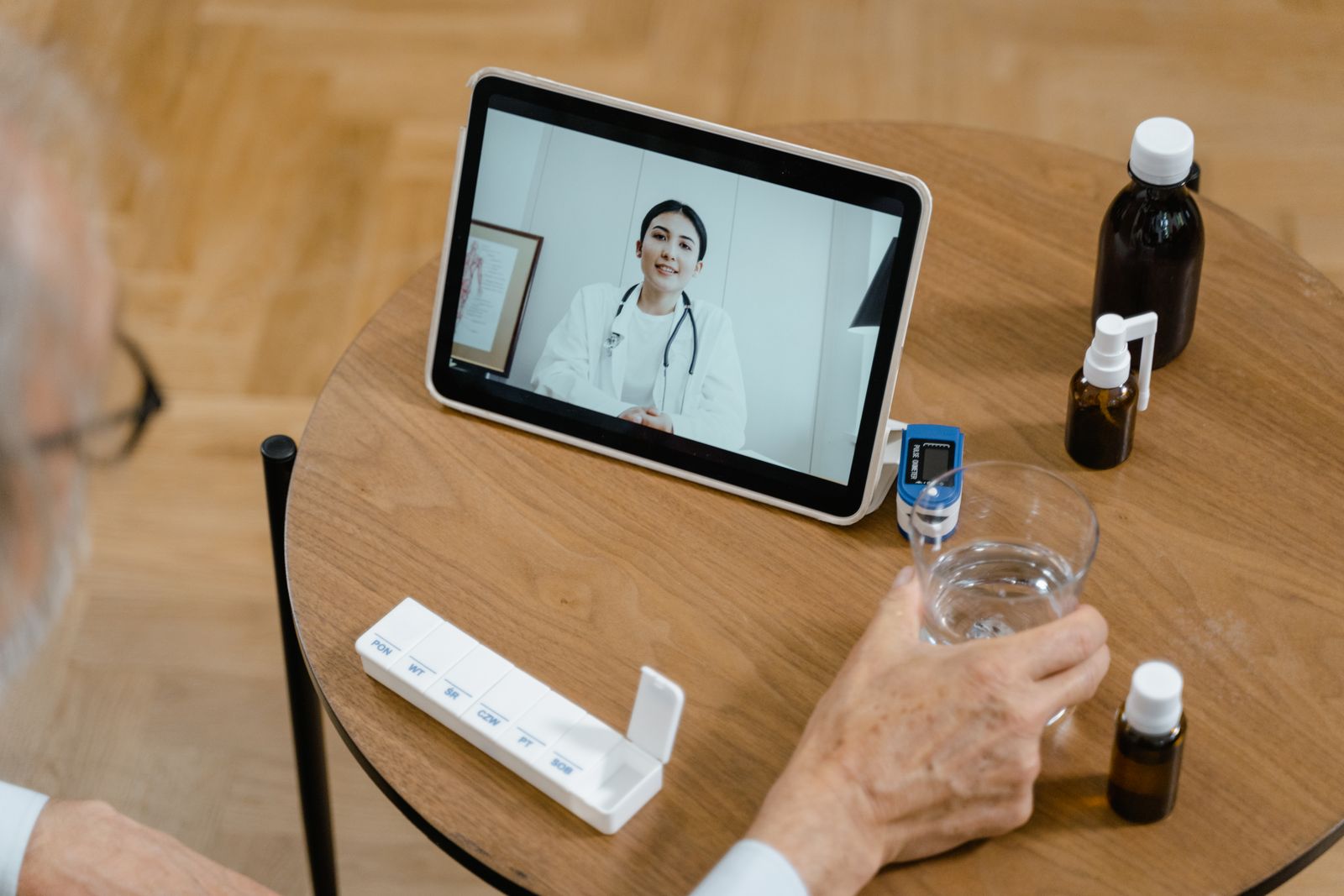
Records and Imaging, Inside the Portal
The DICOM vault is the feature practices ask about most. CBCT, panoramic and X-ray files are large, and patients usually leave with a disc or a printout and lose both. In your portal the file opens in the browser as easily as a photo.
- CBCT, panoramic and X-ray files, opened in the browser
- No plugins, no downloads, no patient training
- Lab results, referrals and letters in one timeline
- Reports shared with referring clinicians securely
- Imaging in the portal, the same viewer powers our dental portal, where imaging is the daily workflow. Smart dental portal
- Records from your EHR, synced over FHIR, so the portal shows the chart's truth, not a copy that drifts.
- Signed, expiring links, imaging opens through links that expire, so a forwarded message never becomes open access.
From audit to activation, in five steps
A clear process, with written deliverables at every step. Security is reviewed before launch, and staff are trained before the first patient logs in.
 01
01Scoping & Audit
We audit the current portal, its activation data and the tasks patients fail at, and scope the build around them.
 02
02Patient-Centred Design
Patient journeys are designed on real tasks and tested with people who have never seen the portal.
 03
03Engineering & Integration
The portal is built and connected: FHIR sync, the DICOM vault, milestone billing and secure messaging.
 04
04Security Review
Encryption, access control, audit logging and session rules are tested before any patient is invited.
 05
05Launch & Training
Staff are trained on the workflows behind the portal, then patients are invited in stages we agree.

Milestone Billing and Secure Messaging
Long treatment plans fail on paper statements. The portal charges each phase as it completes, through Stripe, and shows the patient what each payment was for. Clinical questions move into secure messaging, answered inside the chart's workflow instead of over ordinary email.
- Phased treatment estimates, charged by milestone
- Patients see what each payment covered
- Balances and statements in the portal, not the post
- Secure messaging with an audit trail
Milestone billing began in implant dentistry, where plans run longest. See how it supports dental implant marketing, or how intake feeds the portal before the first visit.
Patient Portal Software, Two Honest Routes
Not every practice needs a custom build. If your needs are standard, our ready platform covers the same patient tasks and launches sooner. It is the faster route, and for a single-location practice it is often the right one, with no engineering project to manage.
Choose custom when imaging, phased billing or a deep EHR sync decides the design, or when several locations and brands share one portal. Intake feeds it before the first visit, and the AI receptionist keeps it current.
Which route fits
- Standard features only: the platform is faster
- One location, one brand: the platform usually fits
- Imaging inside the portal: custom build
- Phased or milestone billing: custom build
- Several locations or brands: custom build
- Deep or unusual EHR sync: custom build

Built on Your EHR, Not Instead of It
Your EHR stays the system of record. The portal reads from it and writes back over FHIR, so appointments, charts and reports match on both sides, and if you ever change EHR, the integration layer is rebuilt rather than the portal.
- Interface layer: mobile-first, in your branding
- API layer: rules, roles and validation
- Integration layer: FHIR sync and the imaging vault
- Data layer: encrypted storage and audit logs
Every layer is documented at handover, so your next developer is never guessing how the portal works, or locked out of it.
Privacy & Security
A portal holds your most sensitive data. It is built like it.
A portal is not a marketing page. It holds imaging, messages and payment details, so the safeguards a marketing site argues about are simply the starting point here. Every build is scoped as protected-health-information work from the first conversation.
Here is how we approach it in practice:
- Encryption and access control. Data is encrypted in transit and at rest. Access is role-based, patients see only their own records, and staff access follows the roles you set, reviewed with you before launch. Multi-factor authentication is available for staff accounts.
- Audit logs and session rules. Every record view is logged, sessions time out, and signed links to imaging expire. If a question is ever asked about who saw what, the answer exists, and breach questions can be answered in hours rather than reconstructed from memory.
- Tracking kept out. No advertising trackers run inside an authenticated portal. The US Department of Health and Human Services has published guidance on HIPAA and online tracking technologies, and a signed-in patient area is exactly where that guidance bites hardest.
For more detail, read how we approach HIPAA across our work.
Portals shaped around your practice type
The patient tasks are the same everywhere. The mix of imaging, billing and sync behind them is not.
Dental & Orthodontic Practices
Medical Clinics
Specialist Groups
Multi-Location Networks
Imaging-Heavy Clinics
Hospital Outpatient Services
Dental practices can start from our smart dental portal, shaped for imaging and phased treatment, and medical groups from the wider platform. Every build starts from the same patient tasks. The differences are in the workflows behind them, which is what discovery is for.
Your EHR's portal, or a custom one? An honest comparison
| Question | EHR built-in portal | Custom portal with Med Clinic X |
|---|---|---|
| Patient experience | Built for the chart | Built around patient tasks |
| Branding | The vendor's look | Your brand and domain |
| Imaging | Patients call for copies | DICOM viewer in the portal |
| Billing | Balances and statements | Milestone billing via Stripe |
| Integration | Its own data only | FHIR sync across systems |
| Ownership | Rented from the vendor | Yours, extended as you grow |
If the built-in portal is genuinely enough for your patients, we will tell you.
What does a custom patient portal cost?
We quote per project after discovery, because the honest drivers of cost are knowable only after we see your EHR, your imaging and your locations.
You receive an itemised scope with the integrations named, not a bundle, and a phased build is possible: the dashboard first, imaging and billing in a second phase.
Get a Written Quote for Your PracticeWhat moves a quote
- How deep the EHR integration has to go
- Whether imaging and the DICOM vault are in scope
- Whether milestone billing is required
- How many locations and brands the portal serves
- How much patient data needs migrating
Try the Portal as a Patient
We would rather show you working software than describe it. The demo area includes the patient portal experience, booking, results, messages and payments, exactly as your patients would meet them. Sign in as a patient and try to get lost.
Explore the Portal Demos
Patient Portals, Answered Plainly
What a custom portal includes, how imaging and billing work, and how it connects to your EHR.
Still have a question? Send us your practice details and we will reply in writing.
READY TO TRANSFORM YOUR PRACTICE?
Join Hundreds of Healthcare Providers Who Trust MedClinic X
Book a demo today and see how our platform can help you deliver exceptional patient care.